


Credible Jobs
3.333.00 Reviews
App Specs
- Version
- 2.0.6
- Updated On
- License
- Free
- Downloads
- 10,000+
- Developer
- Credible Technologies
- Categories
- Business
- Platform
- Android
Screenshots

 Analysis by AppCompare
Finding work is already demanding, and the difficulty increases when a job-search tool is hard to read, awkward to navigate, or poorly suited to the way you actually apply. Credible Jobs, a free business app from Credible Technologies, takes a focused approach by bringing job listings, AI-assisted applications, and resume tools into one mobile experience. I found its main appeal in reducing the number of separate steps between noticing a vacancy and preparing an application.
That convenience does not automatically make it the right choice for everyone. A job app has to work for different reading preferences, levels of confidence with technology, physical situations, and application habits. In my experience, Credible Jobs is most useful when treated as a practical starting point rather than a complete replacement for careful job research. Its current version is 2.0.6, it is free to install, and optional in-app purchases range from $14.99 to $59.99 per item, so it is worth understanding where the free experience helps and where extra spending may enter the process.
How Credible Jobs handles readability and navigation
I approach readability and navigation as practical questions: can I find a relevant role, understand its requirements, and review an application without losing track of what I’m doing? In this section, I focus on how a clear sequence can help different users stay oriented, while recognizing that a shorter path is only useful when it also leaves room for careful decisions.
A focused home for job-search tasks
The clearest strength of Credible Jobs is its narrow purpose. Instead of asking me to manage unrelated business tools, it centers the experience on finding employment, preparing application materials, and moving toward an application. That focus matters for people who become overwhelmed when a job search is spread across a browser, a resume editor, an email account, and several employer portals.
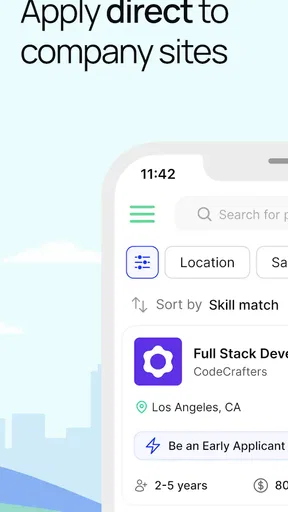
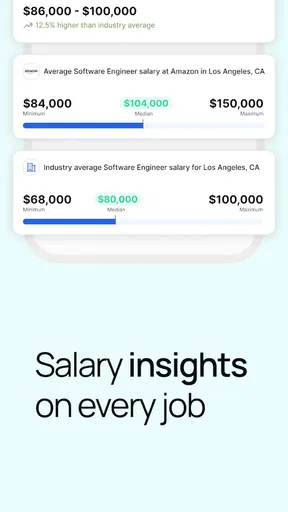
The store summary points to real job listings, AI Apply, and smart resumes, and those three ideas describe the app’s practical workflow. I can begin with a vacancy, consider whether my background fits, and then use the preparation tools before applying. Keeping those activities close together can reduce the mental effort of switching between services, particularly during a long search.
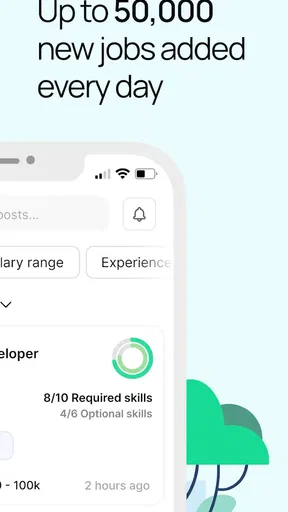
For readability, the most important test is not whether an app looks modern but whether a user can quickly identify the job title, employer, location, requirements, and next action. I would encourage anyone using this app to slow down at the listing stage. AI assistance can make an application faster, but speed should not replace reading the qualifications carefully. A polished resume aimed at the wrong role is still a poor application.
Useful organization, with a need for personal checking
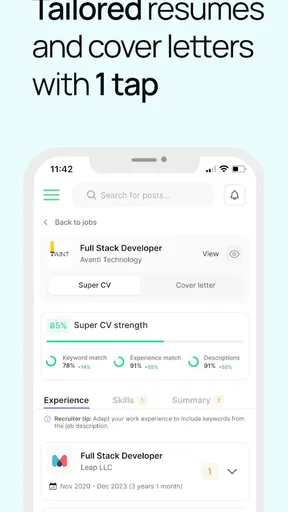
The resume side is potentially valuable for people who know their work history but struggle to turn it into clear application language. “Smart” resume support can help structure information more confidently than starting with a blank document. I see this as especially helpful for first-time applicants, people returning to work, and users changing industries who need to translate familiar experience into language employers recognize.
Worth Reading Before You Choose

Flipboard Shows What News Apps Must Do Beyond the Feed

Switching to Android Auto Means Rethinking Your Driving Routine

Google Calendar Makes a Crowded Week Easier to Manage

Ludo King Makes the Most of the Minutes Between Plans

Baby Panda World Brings Quick Play to Modern Phones, but Its Game Library Feels Busy

ESPN’s Live Game View Makes Following Close Games Easier
There is an important trade-off, though. Automated suggestions may make several applications sound alike if I accept them without editing. My best approach would be to use the generated wording as a draft, then restore specific details: the tools I used, the type of customers I helped, the scale of a responsibility, or the result of a project. That extra pass makes the document more personal and gives me a chance to remove claims that do not accurately describe my experience.
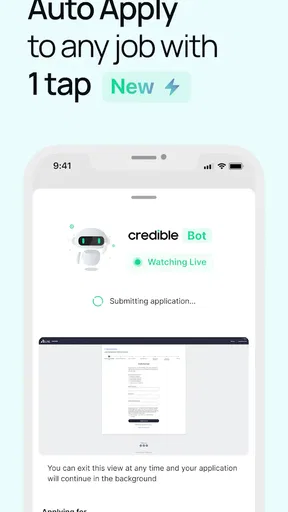
Navigation also depends on how much information appears at once. Job seekers with dyslexia, attention difficulties, or limited experience with recruitment websites may benefit from a shorter path through the process, but they may still need to pause and review each screen. I would not assume that an AI Apply button means the application is fully automatic or that every employer uses the same process. The safest habit is to check what information will be submitted and whether an employer’s own questions still require an answer.
Who can get the most from the layout
Credible Jobs seems best suited to someone who wants a single mobile place to organize an active search. It can be a good fit for a recent graduate applying to several similar roles, a worker looking for a change during a busy week, or someone who needs help turning an existing resume into a more targeted version. The app’s presence on Android is also relevant for people using older devices, since it supports Android 7.0 and later.
On the other hand, a professional who already has a carefully designed resume, a strong spreadsheet system, and direct relationships with employers may gain less from its guided workflow. The same is true for someone applying to highly specialized roles where every application needs extensive research and a very personal cover letter. In those situations, a conventional document editor and the employer’s own career page may offer more control.
Motor, sensory, and situational considerations
I also consider how the same job-search workflow feels when someone is typing with discomfort, reading on a small screen, or fitting applications around a busy day. These circumstances can change which conveniences matter most, so I look at ways to make each session more manageable before turning to the specific sensory and situational trade-offs.
Reducing repeated typing can matter
Job applications often involve repetitive typing, copying dates, rewriting descriptions, and moving information between forms. Any workflow that reduces those repeated actions can be useful for people with hand pain, limited dexterity, fatigue, or temporary injury. Credible Jobs’ combination of resume support and AI Apply has practical potential here: preparing core information once may make later applications less physically demanding.
That benefit should be viewed as assistance, not a guarantee that every application can be completed with minimal interaction. Employer forms may still ask for additional details, confirmations, or written responses. I would keep a short personal document with employment dates, qualifications, references, and preferred contact details so that I do not have to reconstruct the same information under pressure. This is one of the simplest ways to make the app’s workflow easier on both hands and memory.
For users who rely on voice input, large text, screen magnification, or other device-level settings, the important question is how comfortably the app’s controls and text behave with those settings. The app is rated Teen, and it runs on Android 7.0 or later, but those facts do not by themselves establish support for a particular assistive technology. I would test the search, listing review, resume editing, and application steps with the accessibility settings already used on the phone before committing to the workflow.
Reading fatigue and sensory load
Job listings can be tiring even when an interface is technically easy to use. Long requirements, unfamiliar terminology, and repeated employer descriptions create a heavy reading load. I found that the most sensible way to use Credible Jobs is in small sessions: search for a narrow type of role, shortlist the listings that genuinely match, and only then begin preparing applications. This avoids turning a long scroll through vacancies into an exhausting task.
People sensitive to visual clutter may prefer to work from a written shortlist rather than opening every result. I would record the employer, role, location, closing information when shown, and one reason the job is suitable. That simple method makes it easier to return later without rereading everything. It also helps prevent AI-generated resume changes from becoming the only basis for deciding whether a job is worth pursuing.
For users with hearing loss, the core job-search activities appear more naturally suited to reading than to audio-dependent use, but I would still judge the app by the actual prompts and feedback shown during an application. For users with low vision, color contrast, text size, and the clarity of buttons are more important than decorative design. Since those experiences vary by device and system settings, a short trial is more informative than assuming that a business app will work equally well for every user.
When the phone is the only practical device
Credible Jobs makes particular sense in situations where a computer is unavailable. Someone commuting, sharing a household computer, taking a break at work, or managing a job search from a small living space may prefer a phone-based process. A mobile workflow can also help a person respond while a suitable listing is fresh, rather than waiting until they have access to a desktop.
That convenience comes with a smaller screen and a greater risk of accidental taps. I would avoid submitting an important application while distracted or walking, even if the app makes the process feel quick. A better routine is to save the opportunity mentally or in a note, review the resume on a stable connection and in a quiet place, and submit only after checking names, dates, and contact details.
Situational access also includes language confidence, internet reliability, and privacy. Someone who is comfortable speaking about their experience but less comfortable writing may appreciate resume assistance, while someone with unreliable connectivity may prefer to prepare documents elsewhere and use the app only when a stable connection is available. I would also avoid entering sensitive information until I understand why it is needed and where the application is taking me.
Remaining barriers and the limits of automation
Automation can reduce repetitive effort, but it cannot take responsibility for whether an application is accurate, appropriate, or sent to the right place. I weigh the value of that assistance against the checks a person still needs to make, including situations where a direct employer process or human guidance is the safer choice.
AI Apply still needs human supervision
The most tempting feature is likely AI Apply, because it promises to reduce the tedious part of applying. My concern is that a faster application can become a less thoughtful one. Automated wording may miss a requirement hidden in a listing, overstate a skill, or fail to explain an unusual career path. Users with limited digital confidence could be especially vulnerable to assuming that the app’s suggested content is automatically correct.
I would use a three-step check before sending anything. First, compare the resume language with the vacancy and remove skills I cannot demonstrate. Second, check personal details and employment history for accuracy. Third, look at the final destination and confirm that the application is genuinely for the intended employer and role. This takes longer than pressing a single button, but it protects the quality of the application and helps users remain in control.
Free access versus optional spending
The app is free, which makes it approachable for people who are unemployed or trying to limit job-search costs. At the same time, optional purchases can cost from $14.99 to $59.99 per item. That creates an important decision point: paying may be reasonable if a feature saves substantial time during a serious search, but it is not automatically worthwhile for occasional browsing.
I would first establish whether the free tools are enough for my actual routine. If I am applying to only a few carefully chosen roles, manual editing may provide better value than purchasing additional assistance. If I am applying frequently and the paid feature genuinely removes repetitive work without reducing accuracy, the calculation changes. Either way, I would read the purchase screen carefully and avoid treating payment as a promise of employment.
Where traditional alternatives are stronger
Credible Jobs has an advantage over a basic job board when I want listings and application preparation in one place. It is also more guided than opening a blank resume document and trying to guess what employers expect. That makes it appealing for users who need structure.
Traditional alternatives remain better in several situations. An employer’s own career site is usually the right place to verify the official application route and read company-specific instructions. A standard word processor gives more precise control over formatting, which matters for applicants with an established professional resume. A spreadsheet or notebook can be better for tracking follow-ups, deadlines, and networking conversations. I would use Credible Jobs alongside those tools rather than expecting it to replace every part of a careful search.
The app also should not be treated as a substitute for human advice when a person has a complex employment history, a disability disclosure decision, immigration-related questions, or a specialized professional profile. A career counselor, trusted mentor, or experienced colleague can notice context that automated resume assistance may miss. The strongest workflow combines the app’s convenience with another person’s judgment when the situation is sensitive.
My inclusive verdict on Credible Jobs
Credible Jobs is a practical business app from Credible Technologies for people who want job discovery, AI-assisted applications, and resume preparation close together. Its average rating is 3.3 from around 93 ratings, and the app has passed 10K+ installs, which suggests a modest but real user base rather than a universally established service. Released on Aug 15, 2024, it is still a relatively young option, so I would approach it with curiosity and careful checking rather than assuming it has solved every job-search problem.
I like the way its focused workflow can reduce repeated typing and the stress of starting a resume from nothing. Those advantages may be meaningful for users with limited time, limited computer access, reading fatigue, or uncertainty about how to present their experience. The app can also help someone create a repeatable routine: shortlist suitable jobs, adapt the resume, review the application, and keep personal notes outside the app for follow-up.
Its inclusive value depends on how much control the user retains. People who can comfortably review generated text, adjust phone settings, and verify employer details are likely to get the most from it. People who need highly predictable accessibility behavior, extensive desktop formatting, or one-to-one guidance should test it cautiously and keep another method available. The app may support a more manageable search, but it should not be mistaken for a guarantee that every screen, form, or employer process will suit every ability.
My recommendation is to try the free experience with one realistic application before considering any optional purchase. Choose a role you understand, compare the app’s resume suggestions with your real history, and inspect every step before submitting. If that trial feels readable, manageable, and accurate, Credible Jobs could become a useful companion for an active search. If it makes you rush, hides important context, or leaves you unsure what was submitted, a direct employer site and a manually controlled resume may be the better choice.
Overall, I see Credible Jobs as a helpful bridge between searching and applying, especially for users who need structure more than advanced career management. Its best feature is not simply automation; it is the possibility of making a difficult process feel more organized. The right expectation is modest but useful: let it reduce friction, keep human judgment in charge, and choose the workflow that leaves you confident about what an employer will actually receive.
Pros
- Simple interface makes job searching quick and easy.
- Useful filters help narrow listings by role
- location
- and experience.
- Job details are presented clearly before applying.
- Convenient access to new opportunities from a mobile device.
- Can help users discover remote and flexible work options.
Cons
- Some listings may have limited information about the employer.
- Job availability can vary significantly by location.
- Application processes may redirect users to external websites.
- Not every posting may be suitable for entry-level applicants.
- Users should verify listings carefully to avoid misleading offers.
FAQs for Credible Jobs
What is Credible Jobs and what can I use it for?
Credible Jobs is a job-search application designed to help users discover employment opportunities in one place. After exploring the app, its main purpose appears to be connecting job seekers with available vacancies, allowing them to browse listings, review position details, and identify roles that match their experience or interests. It can be useful for people actively searching for work, considering a career change, or looking for flexible and remote opportunities.
Is Credible Jobs free to download and use?
The application may be available to download without an upfront charge, but users should carefully review the current store listing and the app’s terms before registering. Some job-search services are free for applicants, while optional features, premium services, or third-party offers may involve costs. Credible Jobs should be used with attention to any payment requests, subscriptions, or conditions presented during the sign-up and application process.
How do I apply for jobs through Credible Jobs?
Typically, you begin by creating a profile and providing relevant information such as your work history, skills, education, and preferred job type. You can then browse available listings, open a vacancy to read its requirements, and follow the instructions provided to apply. Depending on the employer, the application may be completed inside Credible Jobs or through an external company website, so check the destination carefully before submitting personal information.
Is Credible Jobs safe and are the job listings trustworthy?
Credible Jobs can be a convenient starting point for finding employment, but no job platform can guarantee that every listing or contact is legitimate. Before sharing documents or financial details, research the employer, verify the company’s official website, and be cautious of offers promising unusually high pay for little work. Never pay upfront fees for a job, and avoid sending banking passwords, codes, or unnecessary identity documents.
What information should I prepare before using Credible Jobs?
To get better results from Credible Jobs, prepare an updated résumé, a short professional description, your employment history, education details, key skills, and the type of position you want. It is also helpful to define your preferred location, salary expectations, schedule, and willingness to work remotely. Keep sensitive information private until you have verified the employer and confirmed that the application process is genuine.


